Run it on iPad.
Create scripts, organize your music and run your entire event from your iPad. No Mac required.
View the iPad app →iPad app available now · Mac edition coming soon
Use your iPad to run the whole show. Or choose the upcoming full Mac app, with more room to edit and perform. Add an iPhone or iPad for optional wireless control while the Mac handles the audio.
iPhone and iPad: Three Live Cues are free with no time limit. Paid access is $3.99 weekly, $14.99 monthly, $59.99 yearly, or $99.99 lifetime. Weekly, monthly, and yearly plans renew automatically until canceled; lifetime is a one-time purchase. There is no free trial. Android: Start a two-day Pro trial when you are ready, then continue with the free preview or choose the $39.99 lifetime unlock. Android has no subscription or automatic charge.
Choose the setup that fits your show
Create scripts, organize your music and run your entire event from your iPad. No Mac required.
View the iPad app →A full desktop player with a spacious script and song editor, familiar file browsing and a separate script window for another display. No iPad required.
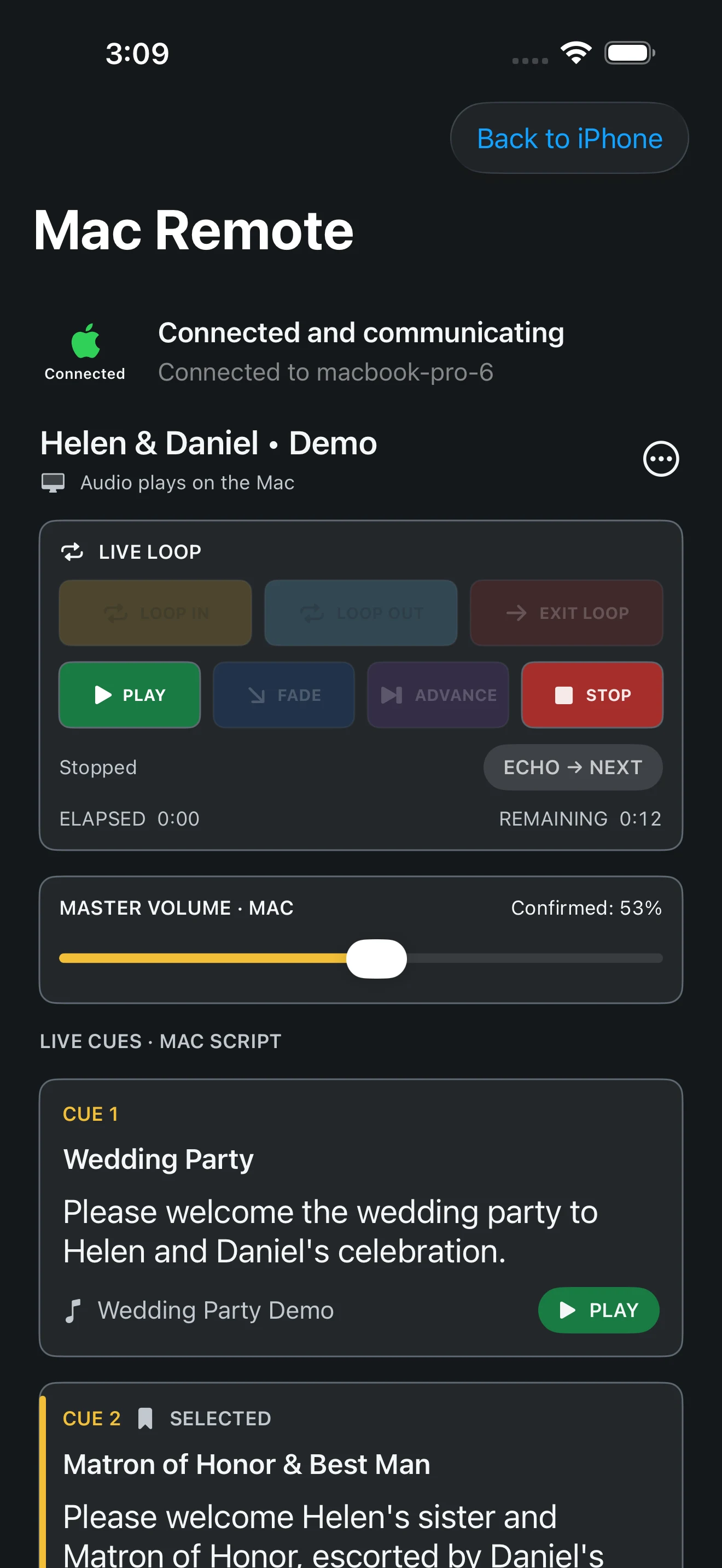
Follow the script and control music, volume, loops, fades and echo-to-next over Wi-Fi. The Mac plays the audio; your mobile device is the remote.
The full Mac edition and wireless remote are in development and are not included in today’s mobile download. Mac availability and purchase details will be announced at release. The Android edition remains available separately.
A closer look at the Mac preview
Move between songs in one editing workspace. Save a portable project copy wherever you choose. Keep your script on a separate display while the main player stays close at hand.
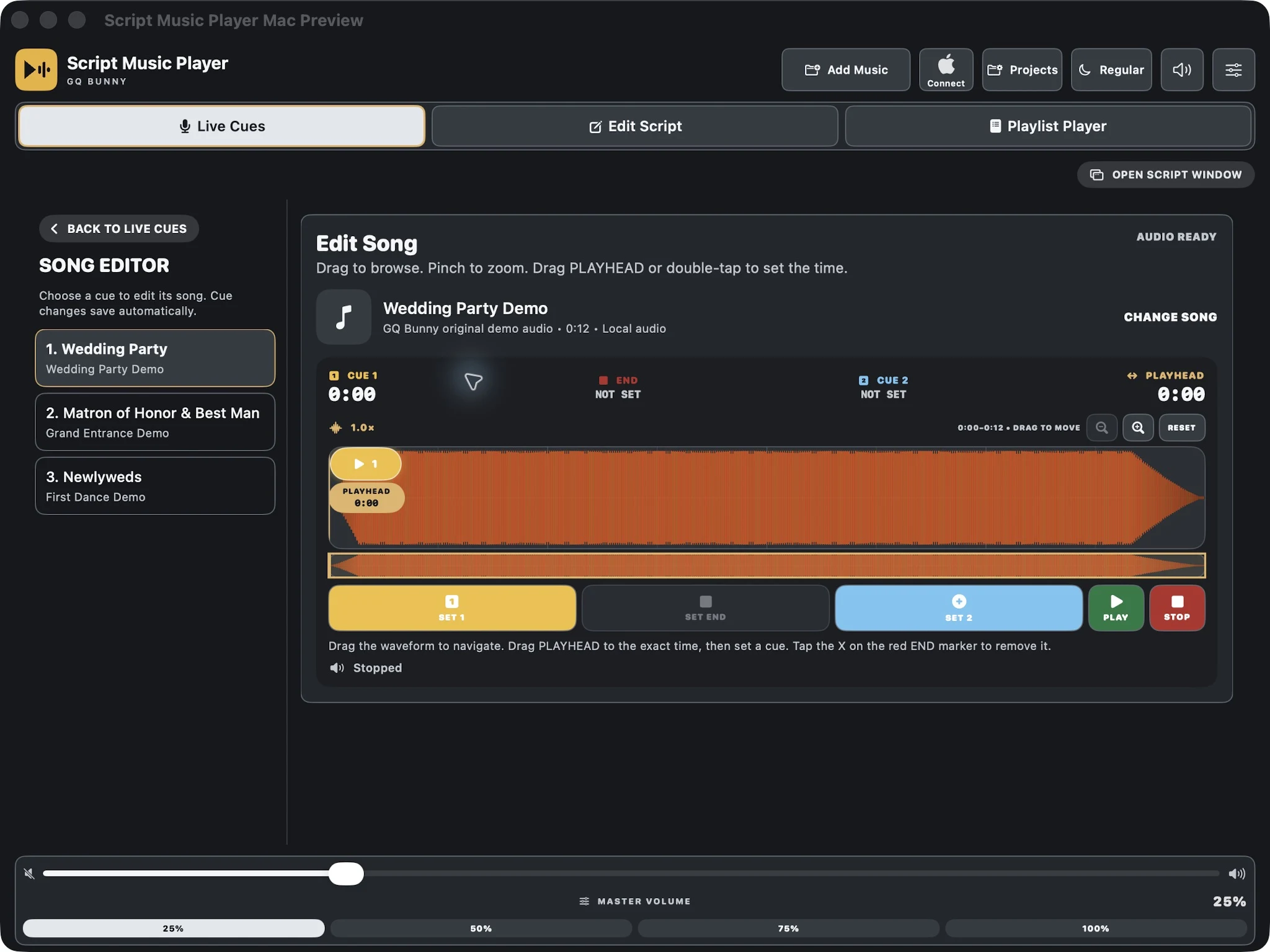
Keep every name, spoken line, assigned song, and waveform visible while introductions are happening.
Set exact start and stop points, scrub the waveform, and prepare each entrance before guests arrive.
Use large Play, Pause, Stop, Fade, Advance, Loop In, Loop Out, and Exit Loop controls under pressure.
Run cocktail, dinner, or open-dancing music in Playlist Player without disrupting the introduction cues.
Designed for the moment the room is watching
Live Cues is built to reduce hunting through screens. The current script, music assignment, waveform, cue controls, loop state, audio route, and master volume remain easy to read on an iPad.

Built for live-event professionals
Questions
No. The iPad app is a complete standalone player. You can create scripts, import music and run an event without a Mac or a network connection.
Yes. The upcoming Mac edition is a full desktop app with its own editing, project and playback controls. An iPhone or iPad is optional.
With compatible versions on both devices, join a local Wi-Fi network that allows them to communicate, enable remote control on the Mac, then tap the Apple connection symbol on your iPhone or iPad and enter the pairing code. Green means connected and communicating; red means the link has dropped. The Mac handles the audio.
The Mac keeps playing. Remote controls become unavailable until you reconnect, and disconnected commands are not replayed later. Keep the Mac player accessible during an event. Pairing requires local-network permission; isolated guest networks may block it.
No. Wireless remote control operates the Mac player. It does not transfer the project or music to your iPhone or iPad.
It helps wedding DJs, emcees, performers, and event professionals run spoken introductions and precisely timed music cues from an iPhone, iPad, or Android device.
Yes, for standalone playback with saved scripts and imported local audio. Optional Mac remote control needs a working local Wi-Fi connection between devices, even when venue internet is unavailable.
No. Script Music Player is a standalone app for iPhone, iPad, and Android.
Use audio you own or have permission to use. On iPhone and iPad, import through Files and supported cloud providers or sync supported downloaded Music items. See the Google Play listing for Android import options.
iPhone and iPad: Three Live Cues are free with no time limit. Paid access is $3.99 weekly, $14.99 monthly, $59.99 yearly, or $99.99 lifetime. The weekly, monthly, and yearly plans renew automatically until canceled. There is no free trial. Android: Start a two-day Pro trial when you are ready, then continue with the free preview or buy the $39.99 lifetime unlock. Android has no subscription or automatic charge.

Script Music Player
On iPhone and iPad, use three Live Cues free, choose a renewing plan from $3.99 weekly, or buy $99.99 lifetime access. On Android, start a two-day Pro trial and choose the optional $39.99 lifetime unlock with no subscription.